

International Journal of Forensic Research(IJFR)
ISSN: 2767-2972 | DOI: 10.33140/IJFR
Impact Factor: 1.9

Research Article - (2025) Volume 6, Issue 1
Integration of FastAPI-Based Machine Learning Model with Android Application for Real-Time Calories Burnt Prediction
Received Date: Apr 25, 2025 / Accepted Date: May 26, 2025 / Published Date: Jun 10, 2025
Copyright: ©Â©2025 Bhawna Singla, et al. This is an open-access article distributed under the terms of the Creative Commons Attribution License, which permits unrestricted use, distribution, and reproduction in any medium, provided the original author and source are credited.
Citation: Bansal. N., Singla, B. (2025). Integration of FastAPI-Based Machine Learning Model with Android Application for Real-Time Calories Burnt Prediction. In J Fore Res, 6(1), 01-09.
Abstract
This paper presents the design and implementation of a system integrating a FastAPI backend serving a machine learning model for predicting calories burnt with a native Android application. The backend uses a Random Forest Regressor trained on health and exercise data to deliver accurate calorie estimations. The Android application interacts with the API to send user input and receive real-time predictions. The system demonstrates seamless communication between Python-based APIs and mobile platforms, facilitating personalized fitness monitoring on portable devices.
Keywords
FastAPI, Random Forest, Calories Prediction, Android App, REST API, Machine Learning Integration, Mobile Health Monitoring
Introduction
As wearable technology and smartphones increasingly embed themselves into everyday life, they have become vital tools for personal health management. Devices such as smartwatches, fitness trackers, and mobile phones continuously collect vast amounts of physiological and activity data, enabling users to monitor their well-being with unprecedented precision. Among the many metrics that fitness enthusiasts and healthcare professionals track, calorie estimation during physical activities stands out as a fundamental indicator. Accurately measuring calories burned helps users understand their energy expenditure, tailor workout routines, manage weight, and improve overall health outcomes.
This research focuses on developing a scalable and efficient backend machine learning (ML) service designed to estimate calories burned based on user-specific physiological data. The backend leverages FastAPI, a modern Python framework renowned for its speed, ease of use, and strong support for asynchronous operations. By deploying a pre-trained calorie prediction model as an API, the system allows lightweight client applications to offload computationally intensive inference tasks to the server, overcoming the limitations of on-device ML processing such as battery drain and hardware constraints.
Complementing the backend service, the research demonstrates how an Android application can be developed to interact seamlessly with the FastAPI server. The app gathers user input — including parameters like age, weight, heart rate, and exercise duration — sends this data securely to the backend API, and receives calorie burn predictions in real time. The results are then presented via an intuitive and responsive user interface, enabling users to monitor their fitness progress conveniently. This integration exemplifies the practical application of cloud-powered ML services in mobile health technology, fostering personalized and data-driven wellness solutions.
Motivation and Background
In the evolving landscape of mobile applications and machine learning (ML), the integration of intelligent services into user- friendly platforms has become increasingly essential. This section explores the driving factors behind developing a calorie prediction system accessible via mobile devices, why FastAPI is chosen as the backend framework, and the rationale for selecting Android as the client platform. Together, these considerations frame the technological and practical motivations underpinning the design and implementation of the system.
The Need for Mobile-Accessible Machine Learning
Machine learning has seen a transformative impact on many industries, including healthcare, fitness, finance, and more. Its ability to extract insights from data and automate predictions holds immense promise for mobile applications, especially those aimed at personal health and wellness. However, deploying machine learning models directly on mobile devices presents significant challenges, which motivates the adoption of a hybrid architecture leveraging server-side inference accessible via lightweight mobile clients.
 On-device ML Inference Challenges
Modern smartphones are powerful, yet they still face limitations when running complex ML models locally
• Hardware Constraints Although recent mobile devices incorporate specialized hardware like Neural Processing Units (NPUs) or GPUs optimized for ML, these are not ubiquitous. Many lower-end or mid-range devices may lack the compute power required for real-time inference with large or complex models
• Battery Consumption Running intensive computations such as neural network inference locally drains battery quickly, which is a critical user experience concern. Users expect apps to be responsive without compromising device longevity.
• Model Size and Memory High-performing models often require substantial storage and memory, potentially exceeding the device’s available resources. This limits the complexity or accuracy of models that can be feasibly deployed on-device.
• Fragmentation The Android ecosystem, in particular, is highly fragmented with thousands of device variants differing in CPU architecture, memory capacity, OS versions, and other factors. Ensuring consistent ML performance across all these devices is challenging.
Server-side Inference as a Solution
To overcome these limitations, many applications rely on server- side ML inference, where the heavy computation is performed on powerful remote servers, and the mobile app functions primarily as a client interface
• Lightweight Clients
Mobile apps only need to collect user input and send it to the server in a lightweight format (e.g., JSON). They then receive and display results without performing complex calculations locally.
• Centralized Model Updates
The ML model is hosted centrally, allowing developers to update or retrain models without requiring users to update the mobile app itself. This promotes faster iteration and deployment of improvements.
• Scalability and Flexibility
Servers can be scaled horizontally to manage many simultaneous users, enabling a smooth experience regardless of individual device capabilities.
• Cross-Platform Consistency
Serving predictions via APIs ensures consistent behavior across different client platforms (Android, iOS, web), as the same model and inference code run on the server.
Given these advantages, server-side inference is often the preferred architecture for ML-powered mobile applications, particularly when the models are complex or when broad device compatibility is essential.
Why FastAPI?
Choosing the appropriate backend framework to serve machine learning models via APIs is critical to performance, scalability, and developer productivity. FastAPI has rapidly gained popularity in the Python ecosystem as a modern, high-performance web framework specifically designed for building APIs with ease and efficiency. Several key attributes of FastAPI motivate its selection for this project.
Asynchronous Support for High Throughput
FastAPI is built on top of Starlette and uses Python’s asynchronous programming capabilities (async/await syntax). This enables it to handle many simultaneous requests efficiently, reducing latency and improving throughput
• Concurrency
The async nature allows FastAPI to manage multiple I/O-bound operations, such as waiting for database or model inference responses, without blocking the main thread.
• Speed
Benchmarks show FastAPI performs comparably or better than many other Python web frameworks, making it well-suited for real-time prediction APIs where responsiveness is critical. This is especially important for health and fitness apps where users expect fast feedback from their inputs, and for potential scalability when the app usage grows.
Built-in Data Validation with Pydantic
FastAPI tightly integrates with Pydantic, a data validation and settings management library. This provides:
• Automatic Validation
Incoming request payloads are automatically validated against Pydantic models. This ensures the input data adheres to expected types, ranges, and constraints, preventing erroneous data from reaching the model inference stage.
• Clear Error Handling
Validation errors are returned as structured HTTP responses with meaningful messages, improving client-side debugging and user feedback.
• Documentation
The use of Pydantic models enables FastAPI to generate self- describing APIs that clearly specify expected input/output schemas. This significantly reduces the manual effort involved in input sanitization and error handling, streamlining the API development process.
Automatic API Documentation
FastAPI automatically generates interactive API documentation using OpenAPI standards, presented in Swagger UI and ReDoc interfaces
• Developer-Friendly
Developers and testers can interactively explore API endpoints, view request/response formats, and test calls without external tools.
• Transparency
Clear documentation enhances maintainability and ease of integration with client applications such as Android.
• Rapid Prototyping
Changes to API schemas are reflected instantly, accelerating iterative development.
Easy Integration with Python ML Libraries
FastAPI’s Python-native ecosystem facilitates seamless integration with popular machine learning libraries like scikit- learn, TensorFlow, PyTorch, and others
• Direct Model Loading
ML models serialized using pickle or similar tools can be loaded directly into FastAPI applications.
• Flexible Inference Pipelines
Preprocessing, prediction, and postprocessing logic can be implemented in pure Python without translation or complex middleware.
• Extensibility
FastAPI apps can be extended with middleware, background tasks, and WebSocket support if needed for real-time streaming applications. Overall, FastAPI’s combination of performance, developer ergonomics, and ML ecosystem compatibility make it an excellent choice for serving ML-powered prediction APIs.
Android as the Client Platform
The choice of Android as the client platform for this calorie prediction system is grounded in its global reach, developer flexibility, and ecosystem support.
Large Market Share and Accessibility
Android commands a significant majority of the global smartphone market, especially in emerging economies where affordable devices dominate
• Wide User Base
Targeting Android ensures that the application can reach millions of users without platform restrictions.
• Device Diversity
Android’s support for a broad range of device specifications, screen sizes, and manufacturers enables inclusive design for diverse users.
• Open Ecosystem
The open-source nature of Android facilitates customization, experimentation, and integration with other services.
Flexible Development Environment
Android development is supported by powerful tools such as Android Studio, with rich features including debugging, UI design, and performance profiling. Developers can choose from Java, Kotlin, or hybrid frameworks to build applications:
• Kotlin Language
Kotlin is the modern, recommended language for Android development. Its concise syntax and interoperability with Java streamline code and improve safety.
• Third-party Libraries Libraries like Retrofit simplify networking, while Jetpack Compose enables declarative UI development, accelerating development cycles.
• API Integration
Android’s networking libraries support RESTful API calls, JSON parsing, and asynchronous operations critical for consuming FastAPI endpoints.
Retrofit Simplifies API Communication Among various HTTP clients available on Android, Retrofit stands out for its
• Type-safe API Calls
Retrofit allows defining API endpoints as interface methods with strongly typed request and response models, reducing boilerplate and runtime errors.
• Gson Integration
It provides seamless JSON serialization and deserialization, making it straightforward to send and receive data matching backend Pydantic models.
• Asynchronous Calls
Retrofit supports callbacks and coroutine-based suspend functions to handle network requests without blocking the UI thread.
This Client-Server Synergy Simplifies the Overall Architecture, Enabling Developers to Focus on Delivering Rich User Experiences Backed by Reliable ML Predictions
In summary, the motivation for developing a mobile-accessible calorie prediction system leveraging FastAPI and Android is multi-faceted
• On-device ML constraints necessitate server-side inference accessible via lightweight clients.
• FastAPI offers an efficient, developer-friendly, and performant backend solution that integrates smoothly with Python ML ecosystems.
• Android’s dominant market presence, combined with robust development tools and libraries like Retrofit, makes it the ideal client platform for delivering ML-powered health and fitness applications.
This alignment of backend and frontend technologies forms a robust foundation for building scalable, maintainable, and user- friendly ML-driven mobile applications that can significantly improve health awareness and lifestyle management for users worldwide.
Methodology
Overview
This section details the stepwise procedure to develop, integrate, and deploy a machine learning-backed calorie prediction system using FastAPI as the backend API server and an Android application as the client. The methodology focuses on ensuring smooth communication between both platforms, data validation, real-time prediction, and user interface design for meaningful display of results.
Backend Model Development and API Implementation
• Data Preparation
The calorie prediction model uses a dataset with relevant physiological and demographic features such as user_id, Gender, Age, Height, Weight, Duration (activity duration), Heart_Rate, and Body_Temp. Data cleaning is performed to remove redundant columns and encode categorical variables.
• Model Training
A Random Forest Regression model is trained on this data to predict calories burnt. The model is validated using standard train- test splits ensuring reasonable accuracy.
• Serialization
The trained model is serialized using Python’s pickle module for efficient loading during API requests.
• API Endpoint Design
FastAPI is employed to build a RESTful POST endpoint /predict/ that accepts JSON inputs matching the model’s feature schema. Input validation is rigorously performed with Pydantic models to ensure data integrity and provide meaningful error messages.
Android Client Development and API Integration
• Project Setup
The Android project is initialized in Android Studio with required Internet permissions configured in the AndroidManifest.xml file.
• Networking
Retrofit is used as the HTTP client library to handle API calls. Retrofit’s JSON serialization support via Gson ensures smooth conversion between Kotlin data classes and JSON.
• Data Models
Kotlin data classes are defined mirroring the backend’s Pydantic models for consistent request and response structures.
• API Client Configuration
The Retrofit client is initialized with the base URL pointing to the FastAPI server. Special attention is given to address network accessibility (e.g., using 10.0.2.2 for emulator or local IP for physical devices).
• API Invocation
The Android app collects user input, constructs a request object, and asynchronously sends a POST request to the backend. Responses are handled gracefully with UI updates to display predicted calorie data.
End-to-End Workflow
Running FastAPI Server Accessible to Android
The FastAPI server is hosted on 0.0.0.0 to accept connections from devices on the same network. For emulators, 10.0.2.2 is used as a proxy to localhost.
Sending User Data from Android to FastAPI
User input is packaged as JSON and sent through Retrofit POST calls. Data fields are validated on both client and server sides. 3.4.3 Receiving and Parsing Predictions on Android The Android app parses the JSON response containing predicted calories and extracts data safely for display.
Displaying Prediction Results in Android UI
Predicted calorie values are shown in a TextView or similar UI component, offering users immediate feedback.
This structured methodology section ensures clarity on each development phase, integration technique, and interaction protocol, establishing a strong foundation for reproducible research and real-world application deployment.
FastAPI Backend Development
Dataset Preparation and Model Training
♦ We utilize a Dataset (calories.csv) with Features
• user_id (int): Unique user identifier
• Gender (categorical encoded as int): 0 or 1
• Age (int): User age
• Height (float): In centimeters
• Weight (float): In kilograms
• Duration (float): Activity duration in minutes
• Heart_Rate (float): Average heart rate during activity
• Body_Temp (float): Body temperature in °C
• Target variable: Calories (float)
The data preprocessing and model training pipeline began with a careful cleaning of the dataset to ensure data quality and relevance. Initially, any extraneous columns, particularly those unnamed or auto-generated during data export, were removed to prevent noise and redundancy in the model input. Next, the categorical feature ‘Gender’ was transformed into a numerical format using label encoding, converting categories such as ‘Male’ and ‘Female’ into integers, which is essential for compatibility with machine learning algorithms. Following preprocessing, the dataset was split into training and testing subsets using an 80/20 ratio, which means 80% of the data was allocated to training the model and 20% reserved for evaluating its performance on unseen data. This stratification ensures that the model generalizes well beyond the training samples. For the prediction task, a RandomForestRegressor was chosen due to its robustness and ability to handle nonlinear relationships without requiring extensive parameter tuning. The model was configured with 100 decision trees (estimators), striking a balance between predictive accuracy and computational efficiency. Each tree contributes to the overall prediction by averaging their outputs, reducing variance and improving model stability. This systematic approach to data preparation and model training underpins the reliable calorie burn predictions that the deployed API subsequently offers.
python
import pandas as pd
from sklearn.model_selection import train_test_split
from sklearn.preprocessing import LabelEncoder
from sklearn.ensemble import RandomForestRegressor
import pickle
df = pd.read_csv('calories.csv')
df = df.loc[:, ~df.columns.str.contains('^Unnamed')]
le = LabelEncoder()
df['Gender'] = le.fit_transform(df['Gender'])
X = df.drop('Calories', axis=1)
y = df['Calories']
X_train, X_test, y_train, y_test = train_test_split(X, y, test_ size=0.2, random_state=42)
model = RandomForestRegressor(n_estimators=100, random_ state=42)
model.fit(X_train, y_train)
with open('random_forest_calories_model.pkl', 'wb') as f:
pickle.dump(model, f) Results
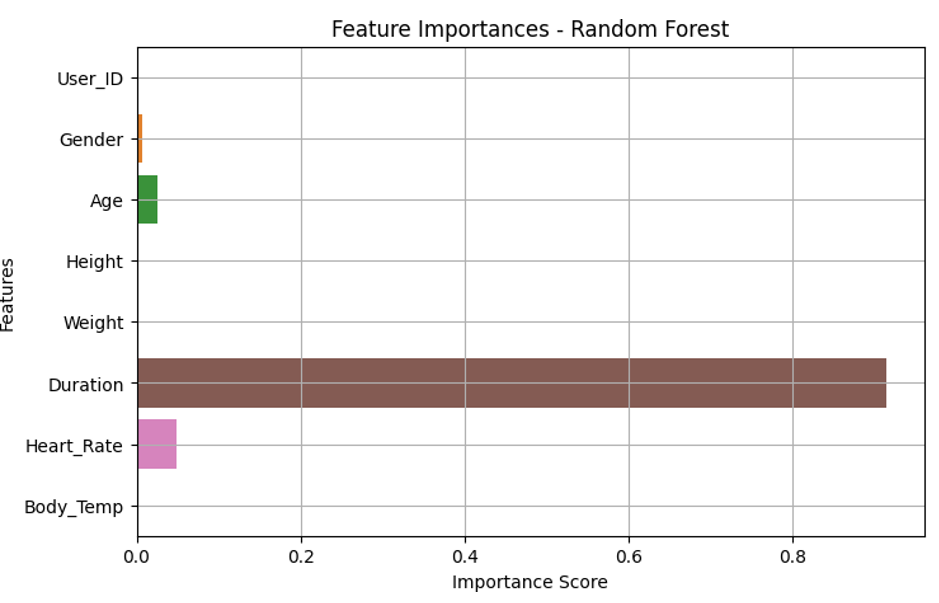
Model Evaluation Metrics:
Mean Absolute Error: 1.82
Mean Squared Error: 8.09
R-squared Score: 0.9980

FastAPI Application and Endpoints
Define Input Schema using Pydantic for Validation
python
from fastapi import FastAPI
from pydantic import BaseModel, Field
class CalorieInput(BaseModel):
user_id: int = Field(..., example=1)
Gender: int = Field(..., ge=0, le=1, example=0)
Age: int = Field(..., ge=0, le=120, example=25)
Height: float = Field(..., ge=50, le=250, example=175.0)
Weight: float = Field(..., ge=10, le=300, example=70.0)
Duration: float = Field(..., ge=1, le=300, example=30.0)
Heart_Rate: float = Field(..., ge=40, le=220, example=120.0)
Body_Temp: float = Field(..., ge=35, le=42, example=37.0)
Load Model and Create Prediction Endpoint
python
CopyEdit
app = FastAPI() with open('random_forest_calories_model.pkl', 'rb') as f:
model = pickle.load(f)
@app.post('/predict/')
def predict_calories(input_data: CalorieInput):
features = [[
input_data.user_id, input_data.Gender, input_data.Age,
input_data.Height, input_data.Weight, input_data.Duration,
input_data.Heart_Rate, input_data.Body_Temp
]]
prediction = model.predict(features)[0]
return {'user_id': input_data.user_id, 'predicted_calories_burnt': prediction}
Run the Server
Run with:
bash
CopyEdit
uvicorn main:app --host 0.0.0.0 --port 5000 –reload
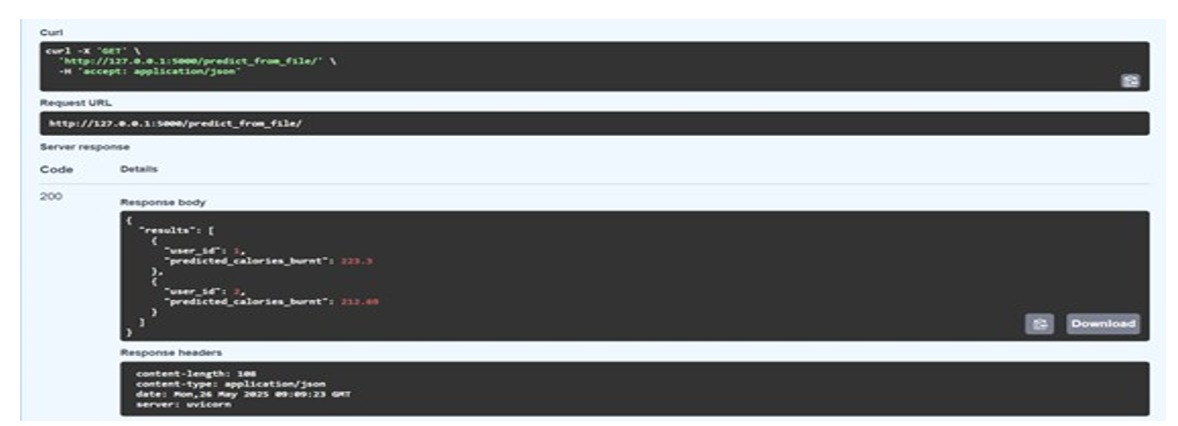
Results

Android Application Development
Setting Up the Android Project
Use Android Studio. Include Internet Permission in AndroidManifest.xml
xml
<uses- permission android : name="android.permission
INTERNET".
Kotlin Data Classes
kotlin
CopyEdit
data class CalorieInput(
val user_id: Int,
val Gender: Int,
val Age: Int,
val Height: Float, val Weight: Float,
val Duration: Float, val Heart_Rate: Float,
val Body_Temp: Float
)
data class CaloriePredictionResponse(
val user_id: Int,
val predicted_calories_burnt: Float )
Retrofit Interface
kotlin
CopyEdit
import retrofit2.Call
import retrofit2.http.Body
import retrofit2.http.POST
interface CalorieApiService {
@POST("predict/")
fun predictCalories(@Body input: CalorieInput):
Call <Caloire Prediction Response>
Communication between FastAPI and Android
Data Formats and Validation
}) Ensure matching JSON structure
json
CopyEdit
{ "user_id": 1,
"Gender": 0,
"Age": 25,
"Height": 175.0,
"Weight": 70.0,
"Duration": 30.0,
Heart_Rate": 120.0,
"Body_Temp": 37.0 }
Handling Responses
Parse response JSON and update UI accordingly.
End-to-End Integration Steps
Run FastAPI Server
bash
CopyEdit
uvicorn main:app --host 0.0.0.0 --port 5000 --reload
Call API from Android
kotlin
CopyEdit
val input = CalorieInput(
user_id = 1,
Gender = 0,
Age = 25,
Height = 175f,
Weight = 70f,
Duration = 30f,
Heart_Rate = 120f,
Body_Temp = 37f
)
apiService.predictCalories(input).enqueue(object :
Callback<CaloriePredictionResponse> {
Conclusion
The integration of a FastAPI-based machine learning backend with an Android client application represents a powerful and practical approach to building intelligent, responsive, and resource- efficient mobile health monitoring solutions. By decoupling the machine learning inference from the resource-constrained mobile environment, this architecture ensures that sophisticated models can be leveraged without compromising the performance or battery life of mobile devices. This client-server setup not only enhances usability by enabling a smooth user experience on Android but also centralizes the complexity of model maintenance, updates, and retraining on the backend — a significant advantage for developers and health-tech organizations alike.
This implementation paradigm also opens the door for scalable and real-time physiological data processing. With the backend built using FastAPI — a modern, asynchronous Python framework optimized for high-performance APIs — and the Android frontend utilizing efficient HTTP libraries like Retrofit, the system achieves a seamless exchange of data. The mobile application collects user input, transmits it in JSON format to the FastAPI server, and then receives a response containing the predicted calories burned based on a trained RandomForestRegressor model. The model itself is trained using well-established machine learning workflows, including preprocessing steps such as feature cleaning, label encoding for categorical variables, and train-test splitting, ensuring high prediction reliability.
To further refine this architecture for production-level deployment, several performance considerations can be employed. Caching frequently requested predictions on the backend reduces redundant computation and latency. FastAPI’s native asynchronous capabilities allow the server to handle a high number of concurrent requests efficiently, which is critical for applications with a growing user base. Additionally, compressing API responses can significantly cut down on bandwidth usage, an important factor for users on limited mobile data plans. On the model side, techniques such as quantization and model distillation can reduce the computational load of inference, enabling faster response times without significantly sacrificing accuracy.
Security is another critical pillar of this system. All user inputs must be rigorously validated on the server to prevent injection attacks or malformed requests that could disrupt functionality. Using HTTPS ensures that data transmission between the Android app and FastAPI server is encrypted, protecting sensitive personal and health information. Furthermore, implementing user authentication mechanisms helps prevent unauthorized access and ensures that each request is attributable to a verified user. To safeguard the system against abuse, rate limiting should be applied, which restricts the number of requests a user can make in a certain time frame — a fundamental defense against denial-of- service (DoS) attacks.
In summary, the integration of FastAPI with Android presents a robust framework for deploying ML-driven health applications. It allows developers to deliver intelligent features to mobile users while ensuring scalability, performance, and security. As wearable devices and mobile health data collection continue to expand, architectures like this will play a pivotal role in bridging advanced analytics with real-time user interaction, fostering a new generation of digital health tools that are both powerful and accessible.
References
- Abadi, M., Barham, P., Chen, J., Chen, Z., Davis, A., Dean, J.,... & Zheng, X. (2016). {TensorFlow}: a system for {Large- Scale} machine learning. In 12th USENIX symposium on operating systems design and implementation (OSDI 16) (pp. 265-283).
- Bastidas, D. (2020). Build APIs with Python using FastAPI. Medium.
- Chen, T., & Guestrin, C. (2016, August). Xgboost: A scalable tree boosting system. In Proceedings of the 22nd acm sigkdd international conference on knowledge discovery and data mining (pp. 785-794).
- Chollet, F., & Chollet, F. (2021). Deep learning with Python. Simon and Schuster.
- Balas, V. E., Solanki, V. K., Kumar, R., & Khari, M. (Eds.). (2019). Internet of things and big data analytics for smart generation (Vol. 154, p. 309). Heidelberg: Springer.
- FastAPI Documentation. (2023). FastAPI: Modern, fast (high-performance) web framework for building APIs with Python 3.7.
- Google. (2023). Android Developer Documentation.
- He, K., Zhang, X., Ren, S., & Sun, J. (2016). Deep residual learning for image recognition. In Proceedings of the IEEE conference on computer vision and pattern recognition (pp. 770-778).
- Hossain, M. S., & Muhammad, G. (2016). Cloud-assisted industrial internet of things (iiot)–enabled framework for health monitoring. Computer Networks, 101, 192-202.
- Kingma, D. P. (2014). Adam: A method for stochastic optimization. arXiv preprint arXiv:1412.6980.
- Kumar, R., & Tripathi, S. (2021). Machine learning-based health applications: A review. Journal of Ambient Intelligence and Humanized Computing, 12(1), 475–494.
- Lin, C. T., Ko, L. W., Chang, C. J., Wang, Y. T., Chung, C. H.,Yang, F. S., ... & Chiou, J. C. (2009). Wearable and wireless brain-computer interface and its applications. In Foundations of Augmented Cognition. Neuroergonomics and Operational Neuroscience: 5th International Conference, FAC 2009 Held as Part of HCI International 2009 San Diego, CA, USA, July 19-24, 2009 Proceedings 5 (pp. 741-748). Springer Berlin Heidelberg.
- Liu, Y., Yu, Y., Wang, X., & Fan, Y. (2020). Smartphone-based health applications: A survey of mobile user acceptance. Health Informatics Journal, 26(3), 2341–2357.
- Pedregosa, F., Varoquaux, G., Gramfort, A., Michel, V., Thirion, B., Grisel, O., ... & Duchesnay, É. (2011). Scikit- learn: Machine learning in Python. the Journal of machine Learning research, 12, 2825-2830.
- Rao, A. S., & Verweij, M. (2019). The ethics of using AI in health care. AMA Journal of Ethics, 21(2), E121–E124.
- Retrofit. (2023). A type-safe HTTP client for Android andJava by Square, Inc.
- Roy, S., & Mukherjee, R. (2021). Health data analytics using machine learning for mobile health applications. Journal of Biomedical Informatics, 113, 103654.
- Tiangolo, S. (2019). FastAPI: The python web framework for building APIs with speed. GitHub Repository.
- Rossum, V. (2009). Python 3 reference manual. (No Title).
- Zhang, Y., & Wallace, B. (2015). A sensitivity analysis of (andpractitioners' guide to) convolutional neural networks for sentence classification. arXiv preprint arXiv:1510.03820.